Articles

Get actionable insights from industry and IntraLinks thought leaders to drive collaboration across your Extended Enterprise.

ARTICLE

Why You Shouldn’t Email Sensitive Corporate Documents

E-mail traverses the public Internet in plain text, and can be easily copied or intercepted. Just ask the Gmail users famously hacked in 2010 and again in 2011, or the U.S. Chamber of Commerce which had at least six weeks worth of e-mail data containing sensitive information stolen in a breach that was widely reported in December 2011.

Today, as increasing global competition drives the need for increasing inter-enterprise collaboration, the use of e-mail to share collaborative information with partners and geographically dispersed team members creates unacceptable security, compliance, and information governance risks. If your users are collaborating on a sensitive project and sharing a confidential document or data, the last thing you want them to do is e-mail it back and forth over the Internet.

"E-mail is the go-to for business people due to ease-of-use and familiarity. They are reluctant to adopt more secure solutions because they intrude on that ease of use," says Christopher Ford, Vice President, Product Management for IntraLinks.

Nevertheless, there are ways employees can share sensitive information with the ease of e-mail and yet with a central point of governance. For example, with secure file-sharing services integrated into your e-mail infrastructure, users remain in control of information — even after a document has been shared — and all communications can be logged.

This article explores several secure e-mail solutions and some of the choices and trade-offs involved in sharing documents securely via the Internet.

Consumer-oriented file-sharing solutions

Perhaps the most popular alternative to e-mailing documents is to use one of the dozens of consumer-grade file-sharing solutions, such as YouSendIt, Dropbox or Box.net. With these services, you upload your document to their servers and e-mail someone a link to it. Originally created as a way around e-mail attachment file-size limits, these sites became popular for synchronizing files between home and office computers and accessing files from smartphones. Users believe these familiar consumer tools help them get their work done faster.

But these services introduce risk into the enterprise. There are numerous examples of confidential information being inadvertently distributed, sometimes due to poor authentication protocols (Dropbox's authentication issues have been well documented here: http://dereknewton.com/2011/04/dropbox- authentication-static-host-ids/). The recent FBI raid on MegaUpload is an extreme example of one risk: even legitimate users of this file-sharing site (i.e., those not pirating copyrighted content) have lost access to their content and may have had confidential information stolen1.

In addition, using "bring your own collaboration tools" makes the activity invisible to the IT department. Even when IT is aware of their use, the services generally lack transaction logging, which makes document control and security problematic, and eliminates the possibility of tracking content at the enterprise level — for example, for litigation preparedness. Comprehensive transaction logging is critically important — in many cases, failure to log an electronic file-sharing event places a company at risk of non-compliance with industry and privacy laws.

Secure e-mail alternatives and add-ons

Many alternatives are available that enhance e-mail security, and all come with varying levels of ease-of-use and deployment difficulty.

  • Fully encrypting e-mail conversations between sender and recipient is a frequently used way to protect information exchanges. Secure e-mail has been around for more than a decade and ensures that the recipient is the only person who can read your message. Aside from the public key flaws reported in February 20122, most IT departments find encryption tools cumbersome to use and manage, and they create friction and intrusion into users' daily e-mail habits. "This approach also doesn't give you control over a document after the user has received it," said Ford. "You don't get visibility into whether the person opened or forwarded the document, and you can't revoke access or replace content after an e-mail has been sent."
  • Secure file transfer protocols (FTP) have also been in use for many years but are equally cumbersometo use. IT has to set up the FTP site ahead of time, create a user login, grant the proper rights to documents or drives, and test the site to make sure it works. In addition, FTP servers are not always intuitive for non-IT users, and they might require some instruction to use them. Lastly, confidential information stored on an FTP site doesn't expire — it might remain there as long as the site exists.
  • Data leak protection (DLP) tools are great at catching mistakes that lead to data leakage, but don't do much to help keep your confidential information contained within your enterprise if a leakage is intentional. There is also a risk of false positives, which means that valid e-mail could be inadvertently blocked. DLP tools are used mostly for compliance and other regulatory reasons.
  • Secure Intranet/collaboration systems take a great deal of effort to set up and maintain, but generally don't get much user interest or adoption because they don't easily integrate with the e-mail stream that most people use in their daily communications. In addition, they must be extended to meet the needs of inter-enterprise collaboration.
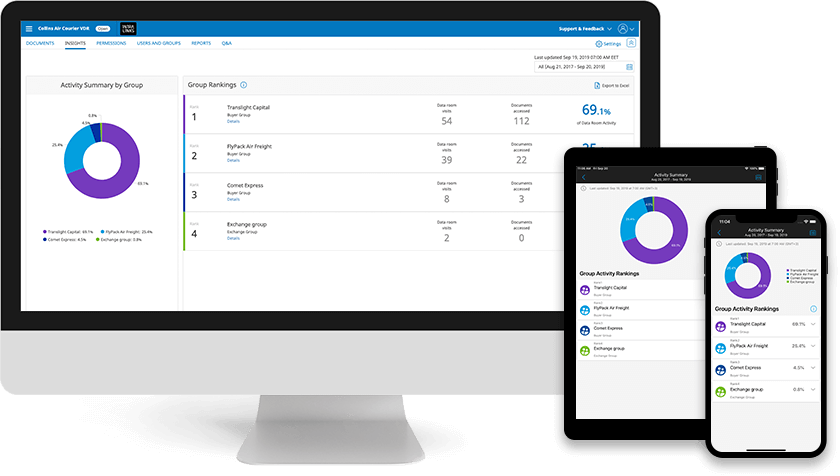
  • Managed file and content transfer services often offer the best combination of features, security and integration with e-mail networks. Cloud-based services such as IntraLinks Courier leverage the security, control and digital rights management inherent in the company's core inter-enterprise content sharing and collaboration platform, yet with integrated ease-of-use that can make the increased functionality virtually transparent to the user.

Secure document sharing issues

As you evaluate any of the above services and solutions, consider the following issues concerning how you intend to share confidential information.

  • Do you need secure inter-enterprise collaboration? Many secure e-mail enhancements and add-ons aren't designed for easy external communications. That's a problem because inter-enterprise collaboration is clearly on the rise, making external security a core requirement.
  • Can your users recall sent messages? This is an important feature, especially in today's world of limited user attention spans and multitasking that can introduce mistakes into the workflowOne." of the biggest sources of data breaches is the 'auto complete' feature in the e-mail 'To' field," points out Ford. Recover when users send confidential documents to the wrong person, document delivery services provide theability to recall files, delete files past a certain date or prevent files from being forwarded or printed.
  • What happens when someone leaves your company? How easy is it to revoke access to a former employee's account so they don't have access to the secure communications path? This is a problem for the e-mail encryption products that require careful crypto key management to ensure that a former employee's keys are turned off.
  • Will wireless networks and devices be used? Except in rare circumstances, CIOs must answer this with a resounding "Of course!" But WiFi, 3G and LTE networks all raise their own security issues — and e-mail isn't safe unless it is protected in every channel.
  • How does the service affect users' existing e-mail experience? Many of the above services require add-ons to existing e-mail networks, or require you to make changes to your networking infrastructure or applications. The fewer changes you have to make, and the higher ease-of-integration, the better. "For Microsoft Outlook, for example, there's a plug-in that allows you to simply click on an icon and use Courier to send your e-mail. You're still filling out an e-mail and making an attachment, but we send it along via a separate secure channel," explains Ford.
  • Can you authenticate recipients and thwart malware such as key-loggers? These are necessary abilities for any service. Of note, a recent New York Times article describes extreme security measures taken by some international business travelers — measures that seem more appropriate to spy films. These include traveling with temporary smartphones and laptops that are wiped clean before departure and again on return home, copying passwords from a USB drive to thwart key-logging malware, and removing phone batteries to prevent remote activation of the microphone during confidential meetings.

Conclusion: Integrate document-sharing services with your e-mail

A full-fledged, cloud-based platform for secure, compliant inter-enterprise content sharing is the ideal way for your enterprise to pursue the collaborative partnerships necessary to business success while maintaining security, compliance, and control. But few organizations can prevent their users from e-mailing sensitive documents.

That's why controlled, auditable file sharing, when integrated with email, is the most effective approach. It logs transactions, gives visibility to content throughout its lifecycle, gives users the speed and flexibility they want — and it keeps the Chief Compliance Officer happy and the company and out of the news.

Services such as IntraLinks' Courier enable the integration of secure document-sharing platforms with e-mail. "What we're really doing is hosting and posting files for secure access; we're not delivering files over e-mail. But we've packaged it in a way that it looks like e-mail so that the ramp-up for users is very quick, and the barriers to adoption are low," explains Ford.

Thanks to the familiar user experience services like Courier provide, their proven security, control and compliance features can make e-mail document sharing safe, after all.

VIRTUAL TOWN HALL

Taking Back Control: Information Governance in the Consumerization Mosh Pit.

Register now for this live, virtual town hall to hear leading CIOs discuss their strategies to enable the collaborative power of the BYOD (Bring Your Own Device) consumerization of enterprise information – without compromising security.

Ask questions in real-time and hear answers from CIOs and the global audience watching the live stream.


WHITE PAPERS

IDC Analysis: Secure, Compliant Collaboration in the Cloud

Get answer and best practices from IDC experts about securely sharing sensitive documents via emerging cloud-based solutions.

Solving the General Counsel’s Information Conundrum in the Cloud

Easily collaborate and share information without compromising security or governance through cloud-based solutions.